What you actually get: the Surfshark One bundle explained
The antivirus has no standalone price. Understanding what else is in the subscription — and what the higher tier adds — is the only way to judge whether it is good value for you specifically.
Advertising disclosure
This article contains paid partner links, marked “Partner link”. If you subscribe after following one, ASSURITY s.r.o. is paid a commission by the advertiser. You pay the same price you would pay going direct. Commission does not buy a favourable verdict: nobody outside this site reads or approves an article before publication, and the drawbacks below were not cleared with anyone. Our editorial policy sets out the rules we work to.
Why there is no standalone price
Surfshark is a VPN company that added an antivirus, not an antivirus company that added a VPN. The scanner exists to make the VPN subscription more compelling, which is why it is not sold on its own and why there is no per-component pricing to compare against a rival scanner.
This has a straightforward consequence for how you should evaluate it. Do not compare the bundle price against a standalone antivirus price. Compare it against what you would otherwise spend on a VPN plus an antivirus, and then subtract the value of anything in the bundle you genuinely will not use.
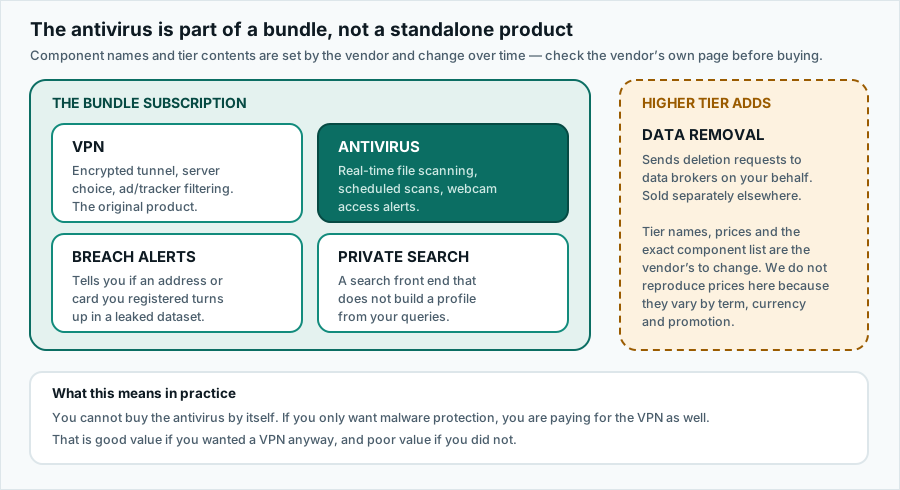
The four components
1. The VPN
The largest and most mature piece. An encrypted tunnel to a server of your choosing, a large server network across many countries, and DNS-level filtering of advertising and tracking domains. Surfshark advertises a no-logs policy and has commissioned external audits of it.
On a public network this is a real security gain, because it stops the network operator seeing which sites you visit. On your own home connection the gain is much smaller, since the traffic contents are already encrypted by HTTPS and you are simply substituting one observer for another. The mechanism explained in full.
2. The antivirus
Real-time scanning, scheduled scans and webcam alerts on Windows, macOS and Android. Feature-by-feature assessment. Which devices it runs on.
3. Breach alerts
Monitoring for your registered email addresses and, optionally, cards and identity documents appearing in published breach datasets. Useful. Also available free elsewhere, and possibly already running inside your password manager or browser.
4. Private search
A search interface that does not profile you. A reasonable thing to include; not a reason to subscribe.
The two tiers
| Component | Base tier | Higher tier |
|---|---|---|
| VPN with unlimited devices | Included | Included |
| Antivirus (Windows, macOS, Android) | Included | Included |
| Breach alerts | Included | Included |
| Private search | Included | Included |
| Data broker removal | Not included | Included |
The data-removal service files deletion requests with data brokers on your behalf and chases them. It is labour that would take you many hours to do manually, so it has genuine value — but it is also sold as a separate product, and its usefulness depends heavily on which country’s brokers hold your data. Price the two routes before assuming the bundle is cheaper.
The unlimited-devices point
This is the bundle’s clearest genuine differentiator and it deserves to be stated plainly. Most competing subscriptions cap you at five, ten or a named number of devices. Surfshark does not cap simultaneous connections.
For a household with two adults, two teenagers, a games console and a smart TV, that difference is the whole argument. For one person with one laptop, it is worth nothing at all. Be honest with yourself about which you are.
Doing the arithmetic honestly
A four-question test that will tell you more than any review score:
- Would you buy a VPN anyway? If no, most of what you are paying for is dead weight, however cheap the bundle is.
- How many of your devices can run the scanner? Count Windows, Mac and Android devices. Exclude iPhones and iPads. If the answer is zero, you are buying a VPN.
- Are you already covered free? Microsoft Defender, macOS Gatekeeper and Play Protect are not placeholders; they are the actual baseline you are paying to improve on.
- What is the renewal price, not the introductory price? See below.
Renewal, the part people miss
This applies to essentially every subscription in this category, not only this one. The headline price is a first-term promotional rate, usually tied to a long commitment paid up front. When that term ends, the subscription renews automatically at the standard rate, which is typically a good deal higher.
None of that is hidden — it is in the terms — but it is easy to skim past when the introductory figure is in large type. Before you buy, find the renewal rate, and put a calendar reminder a week before the term ends.
Your rights on automatic renewal
Under EU consumer law, traders must give clear pre-contractual information about the duration of a contract and the conditions for terminating it, including renewal. Consumers also have a statutory right of withdrawal on distance contracts, subject to specific rules for digital content and services. These rights exist independently of any commercial guarantee the vendor offers, and a term in the vendor’s contract cannot remove them.
The refund window
Surfshark advertises a 30-day money-back guarantee. That is a commercial guarantee offered by the vendor, and its exact conditions — which purchases it covers, how you claim, whether it applies to purchases made through an app store rather than direct — are set out in the vendor’s terms, not here. Read them before relying on the guarantee, particularly if you are buying through a mobile app store, where the store’s own refund process may apply instead.
Accuracy and trademarks
Written by Jennifer Bell and published on . Product details change without notice; where anything here differs from the vendor’s own current information, the vendor’s information prevails. Corrections to info@pravia.online — see our corrections procedure.
pravia.online is an independent publication. It is not affiliated with, endorsed by, sponsored by or otherwise connected to Surfshark B.V., Nord Security, Microsoft, Apple, Google or any other company named on this site. “Surfshark” and all other product and company names, logos and brands are the property of their respective owners and are used here for identification and descriptive purposes only.